
Payment options
M-Pesa, insurances, bank transfers and SHA Cover.
Pay with M-Pesa
Keep the transaction reference for reception.
01
Open Lipa na M-Pesa
Choose Pay Bill in your M-Pesa menu.
02
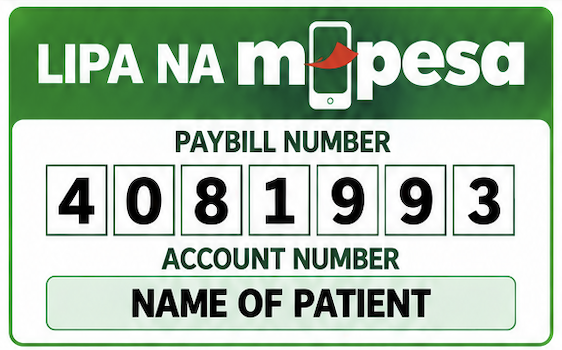
Enter the Paybill
4081993. Use the patient’s name as the account number.
03
Confirm your amount
Use the amount on your hospital invoice. Check the payment details before confirming.
04
Keep your reference
Save the M-Pesa confirmation. Reception will verify the transaction against the correct visit.
Upload your payment proof
Paid already? Send us a photo of your M-Pesa message, bank slip or insurance approval so it is saved with your record in case of any query.
Checking your sign-in…
Insurance accepted here
GA, Old Mutual, SHA, Britam, CIC, APA, Minet-KPLC, Kenyan Alliance and MAKL Scheme (TSC/NPS/KPS).
Insurance and scheme documents
Bring your membership details. Ask reception which services your cover includes and whether authorisation or an out-of-pocket amount applies.
Insurance detailsBank transfers and receipts
Keep your transaction reference. Reception must verify funds before confirming that an invoice is paid. A submitted reference alone does not confirm payment.
Ask reception for the bank details, a copy of your invoice or a verified receipt. Always confirm the patient name, amount and payment destination before transferring money.
Contact receptionIf payment has not been confirmed, check the transaction with reception before trying again to avoid paying twice.